Showing posts with label password. Show all posts

Wednesday, December 6, 2023

Poor Password Habits and Data Breaches. 23andMe Hack is a Wake-Up call.

Daily I am presented with spam check requests and questions from people who wonder why spam exists and why it is increasing.  It's simple.  Governments and companies are recording everything one does when on the web, sites visited, preferences, personal and financial info.  The more data a company keeps, the more data is at risk.

Bad actors know this, and breaches occur daily at large firms.  These breaches involve the theft of millions of records containing info about people, names, addresses, phone numbers and SSNs.  The data is then offered for sale on black websites, sometimes given away for free.

23andMe reported they were hacked in October.  The DNA tester reported that 14,000 accounts were compromised by a hacker.  These 14,000 accounts exposed info belonging to 6.9 million people, (14000=6.9 million ???).  The company stated that their computer network wasn't the source of the hack.  THEIR NETWORK wasn't the source?  Who are they sharing their info with?

The passwords used to break into these accounts had been stolen in other data breaches.  This points out the weakness of using the same password for multiple accounts.  This type of attack is called credential stuffing and victims of this kind of attack include Netflix, Nintendo, Zoom and PayPal.  This attack is not unusual but the data stolen from 23andMe is highly sensitive.

“The issue here is that 23andMe is a social site that also has healthcare information,” he said. “And both of these increase the risk of exposure of the data, and the value of the data itself.” 

https://www.wsj.com/tech/personal-tech/23andme-breach-hack-passwords-7587015f?st=xd2av290cqmo6ga&reflink=desktopwebshare_permalink

I have published this link in the past but it is worth revisiting today.  To check and see if your email address and info have been exposed in previous data breaches, please visit the Have I Been Pawned website.


Worldwide problem.

It's not just US citizens.  The Wall Street Journal reports there have been dozens of leaks involving Chinese firms and agencies.  The Chinese government collects massive amounts of data on it's citizenry to maintain social control.  China has created a strict cybersecurity and data protection realm but still breaches happen.  

In June of 2022, an anonymous user on a popular online cybercrime forum put up for sale data of an estimated 1 billion Chinese citizens that was stolen from the Shanghai police. The heist was one of the largest in history and included particularly sensitive data, such as government ID numbers, criminal records, and detailed case summaries such as allegations of rape and domestic abuse.

The Wall Street Journal has since found dozens more Chinese databases offered for sale, and occasionally free, in online cybercrime forums and Telegram communities with thousands of subscribers.

Tens of thousands more databases in China remain exposed on the internet with no security, totaling over 700 terabytes of data, the largest volume of any country, according to LeakIX, a service which tracks such databases.

The same thing is happening in the US.  Our government is as intrusive as China's, and it had/has lots of allies willing to do it's bidding.  Every day when you are on the web, your viewing sites, preferences and personal info are being recorded.

AI today is playing a larger role in this info drama.  It takes little time for a person's image or name to be researched and in less than 24 hours their home address, phone number, children's schools are Doxed and published in the public domain for everyone to see.

There are private professional companies worldwide who are employed by governments, bad actors and others.  Stealing data and infiltration is their forte.  One such company based in India was highlighted recently by Reuters and the WSJ.  Today I can't find the article or info on WSJ and the link I had for Reuters below explains why.  (I posted the link content below, italics)

 How an Indian startup hacked the world (reuters.com)

Editor’s note

Filed Dec. 5, 2023, 10 p.m. GMT

Reuters has temporarily removed the article “How an Indian startup hacked the world” to comply with a preliminary court order issued on Dec. 4, 2023, in a district court in New Delhi, India.

Reuters stands by its reporting and plans to appeal the decision.

The article, published Nov. 16, 2023, was based on interviews with hundreds of people, thousands of documents, and research from several cybersecurity firms.

The order was issued amid a pending lawsuit brought against Reuters in November 2022. As set forth in its court filings, Reuters disputes those claims.


Driving Force Intel based Powerhouse Workstations (not consumer crap!)


Thursday, May 19, 2022

10 things that let cyber criminals in.

In today's cyber threat environment prompted by economic conditions and amid today's heightened geopolitical tensions due to Russia's invasion of Ukraine, cybersecurity has taken on renewed urgency.

The US Cybersecurity and Infrastructure Agency (CISA) and it's peers around the world have created an issued a list of concerns that prioritize things companies and individuals can do to minimize threats to systems.  This list is called Alert (AA22-137A).

  • Multifactor authentication (MFA) is not enforced.
  • Incorrectly applied privileges or permissions and errors within access control lists. 
  • Software is not up to date.
  • Use of vendor-supplied default configurations or default login usernames and passwords.
  • Remote services, such as a virtual private network (VPN), lack sufficient controls to prevent unauthorized access. 
  • Strong password policies are not implemented. 
  • Cloud services are unprotected. 
  • Open ports and misconfigured services are exposed to the internet.
  • Failure to detect or block phishing attempts.
  • Poor endpoint detection and response.
What should you do?  The italicized items above are within your control.

Multifactor authentication (MFA) or two step is a must for those using SaaS or cloud access services.  Many users consider it an annoying additional step but it is necessary to secure and protect cloud services and assets.  What it does is require one to receive a code via text or email when trying to access the service.

If you or a user's credentials are compromised via phishing or malware the hacker can then access the compromised account from any connected device and cause havoc via using the account to send spam emails phishing for information or carrying malicious attachments.  In addition, they create rules diverting critical emails from financial institutions to their own external email accounts.

What's more, once in they have access to OneDrive and SharePoint documents.  Using this data they can glean information about finance and uncover personal information about other users, staff and clients.

Even worse, an attacker could upload files containing malicious software that can spread to other systems.  Worse yet, Ransomware could be deployed and all of a company's data could be encrypted and held ransom by the attacker.

MFA is becoming a prerequisite required by insurance companies who provide coverage against damage caused by cyber attackers.

If your company has MFA implemented none of the above can happen since the attacker cannot access the compromised account without the code that is delivered via text or a secondary email account.

Software is not up to date.  Because of non patched systems, even MFA was compromised.  Last year Russian hackers combined a default policy shared by multiple MFA solutions and a Windows printer privilege of escalation flaw to disable MFA for active domain accounts and then establish remote desktop protocol (RDP) connections to Windows domain controllers

Be sure to keep your computers and devices updated.  Check and make sure Windows Update is running and apply updates when available.

Use of vendor-supplied default configurations or default login usernames and passwords.  Routers, switches, printers and other devices are delivered with User names and passwords to prevent access to the device and the underlying network.  These credentials are the same for all of a manufacturer's products and readily available via a Google search online.  Discover what your device's credentials are and change them.  You can do this generally via a browser interface using the IP or Mac address or the device.

ISPs, internet service providers routers and equipment are guilty of this as well.  Comcast, AT&T have public IP addresses that can be used to access and exploit the device using these credentials.  Linksys, Netgear and almost all consumer routers are guilty as well.

Strong Passwords.  Too many users take password policy lightly.  Avoid using dates that coincide with life events, i.e. birthdays, anniversaries, etc.  Do not use consecutive numbers and when strong passwords are established, avoid changing a good password by adding a one when it expires, example, Zav98721 to Zav98722.  Attackers and their algorithms are wise to this and once a user and compromised password on on the dark web, an attacker will try this.  For more info on creating strong passwords, see my previous blog post from March 7, 2022.  

https://dforceatl.blogspot.com/2022/03/httpswwwcnbccom20220227most-common.html

For more info on securing your computer and network environment, use the following link to the full article;

https://www.zdnet.com/article/fbi-and-nsa-say-stop-doing-these-10-things-that-let-the-hackers-in/?ftag=TRE-03-10aaa6b&bhid=%7B%24external_id%7D&mid=%7B%24MESSAGE_ID%7D&cid=%7B%24contact_id%7D&eh=%7B%24CF_emailHash%7D


Monday, March 7, 2022

Password Security, Windows 10 settings that need to be turned off, Chromebook use by Date

Good morning.  In today's blog,

- These are the 20 most common passwords leaked on the dark web — make sure none of them are yours

With no end in sight for the Ukraine/Russia conflict and the threat of Russian cyber warfare, it is important for everyone to assess their password strategy to secure their online data.  see below for more info.

- Turn Off These Annoying Windows 10 Settings

One of the default settings in Windows 10 allows Microsoft to use your computer to provide updates to other users on the web?  That's right, your computer and internet connection are being utilize world wide as an update server.  See this section below for more information.

Before You Buy a Chromebook, Check the Expiration Date

Are you considering buying a Chromebook?  Be sure to check your expiration date.  Who'd have thought, Chromebooks have a use by date?

https://www.wsj.com/articles/before-you-buy-a-chromebook-check-the-expiration-date-11646538322?st=8yr80fa3kya5zw5&reflink=desktopwebshare_permalink


These are the 20 most common passwords leaked on the dark web — make sure none of them are yours

CNBC has published a list of the top 20 passwords found on the dark web.  Many of these I have seen in use or a slightly different version from some of those listed.

Password security is a pain I know but it is your only defense in protecting your financial and personal data from being stolen and causing much more pain.

Some of the things you can do is change your passwords on a regular basis and do not reuse passwords either on the same account or use the same password for multiple accounts.  The first thing hackers will do once they have compromised one of your passwords is to try that password on your other accounts.

If you change your password do not perform a simple change such as adding 1 to a number, i.e. Blah987 to Blah988.  They know this trick.  They are equipped with powerful cracking programs that can perform millions of combinations and permutations of passwords based on a cracked password in minutes.  With many computers and lots of compromised systems working for them, they have time on their side.

To see the 20 most compromised passwords, follow the link below and then check the chart below to see how your password stacks up for complicity.

 Most common passwords hackers leak on the dark web: Lookout report (cnbc.com)

If your password wasn't on the list above then just how safe is your current password?  The chart below project just how long it would take a computer to crack your password.

The Y axis depicts the length of your password while the X axis lists complexity.


Turn Off These Annoying Windows 10 Settings

Did you know the default setting in Windows 10 allows Microsoft to use your computer to provide updates to other users on the web?  That's right, your computer and internet connection is being utilize world wide as an update server.

Microsoft plans to roll out Windows 11 to all eligible computers by mid 2022.  That said, if you have a computer that does not meet the hardware requirements to upgrade or prefer to stay with Windows 10 then read the following article and change these settings to improve your computer performance and Windows 10 experience.


DForce Intel based Windows 11 Workstations


Wednesday, May 15, 2019

Warning! If You Save your Passwords in a Browser, Don't miss this Blog Post

If you use your favorite internet browsing program to save passwords for websites, you might want to rethink this policy.  This includes all browser programs, Chrome, Firefox, IE and Safari.  In 3 of these, I found the saved passwords were only protected by a user's password or in the case of Safari, the Admin password.  The other major browser has a default policy of no password and will expose passwords with a few clicks of the mouse, however, it does allow you to set a Master password separate from a user password.

If you continue to use this method to save passwords please use a strong password and not one you use for all your protection including websites.  However, if your browser uses a User or Admin password to protect saved website passwords, I have programs that can crack a forgotten password or generate a new password for a user.  In the event your computer is stolen or accessed by a hacker or criminal, they can simply change your password and then proceed to steal your financial website's user name and password.

Lastly, beware this information is readily available using a Googe search.

Google Chrome

I knew about the Password list under settings of Google Chrome but I had never paid any attention to the settings and details of the list.  Last week a client needed to be able to log in to a company web publishing account that was created by a user who had left the company.  I suggested checking if they had saved the account password in Chrome.  Then we could use Chrome to auto login and change the password.  I checked the password list to see if the password was saved.  What I found was that Chrome will easily spill all its content about passwords, Banks, Stocks, Credit Cards, Facebook, any password that is in the saved password list.

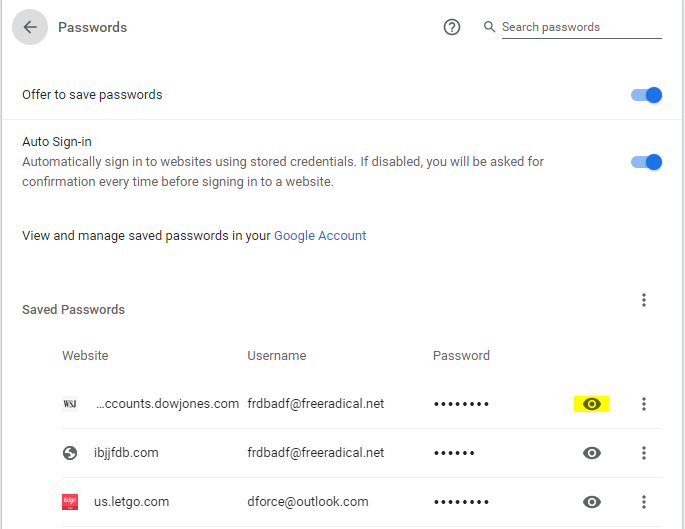
By default, passwords in Chrome's password list are masked by dots to prevent one from seeing the actual password, however by simply clicking on the eye icon next to a password Windows will prompt you for your user login password or pin and voila, all passwords can be viewed by clicking on the eye icon to the right of a saved password.

If you have ever shared your password with a family member, co-worker or haphazardly use easy passwords for protection then any financial, confidential or social media sites you visit that have a saved password can be viewed and compromised.  And let me add this, if I know this then hackers and criminals know this and if your computer is compromised by a trojan or malware then they know where to look to get access to your confidential Financial and Personal information.  These steps are easily found by Googling for the information.

To illustrate how to expose your password info under Chrome, click on the 3 dots in a line, upper right corner of Chrome browser, then select Settings from the drop-down.


Next click on Passwords,


When you do this the saved and not saved Password list appears


Once the list appears, all I have to do is click on the eye icon and the system will respond with the following Window asking for the computer password/pin.


Once you have provided the computer with the correct password/pin, Chrome will then allow you to reveal the hidden password for every saved account.

Below is my IBJJF password exposed (since changed)...


You might think all this is bad enough but no, there's more.

I have a Chromebook and Android phones.  If you have provided your Gmail account to these devices and have Sync and personalize Chrome across your devices turned on, you can go to My Google and find all saved passwords from your Chrome and Android based devices.


Mozilla Firefox and Microsoft Internet Explorer

You may think I'm saying not to use Google Chrome or I am picking on Chrome.  I started with Chrome because it is the most popular Windows Browser now.  However, FireFox and IE both have the same issue.

The default setting for Firefox doesn't require you to provide a password/pin to show passwords.  All you have to do in Firefox is click on the settings icon in the upper right of the Firefox browser, select options,


choose Privacy & Security,


next click on Login & Passwords, Saved Logins.  


click on Saved Logins and you are 1 step away for revealing all saved passwords.

Note:  Mozilla does allow you to "Use a master password" which you will want to do.  This is a better option in my opinion than using the user password for a computer, however as stated this is not the default and Mozilla is wide open otherwise.

Internet Explorer

To accomplish the same feat in IE, go to Internet Tools.  If your browser has the Menu Bar option on simply click on Tools and then select Internet Tools from the dropdown, if you don't see the Menu Bar you can access Internet Tools from the Control Panel.


Next click on the Content Tab and select Settings under AutoComplete


Click on Manage Passwords


To expose a password click on the carat symbol to the right of the password.


As you can see the user ID is already there, you will be asked to provide the user password/pin to reveal the password.


Safari

Apple's Safari browser protects Macs behind the Admin password.  This is only as secure as the password is strong and breakable using 3rd party hacker software.


Thursday, March 7, 2019

Password Security, why 'ji32k7au4a83' is a common and terrible password

The last defense of your business and personal financial information against compromise is your online and/or computer passwords.  Choosing a good password is essential to prevent your confidential information from being stolen, sold and exploited on the internet.

More often than not, people don't put a lot of thought into their passwords.  They use some combination of birthdays, child or pet name and street address to cobble up a password.  In doing so, they haven't thought that a lot of this information is unprotected and readily available on the internet.

When you are online, you are shoulder to shoulder with people from all over the world.  This thought segues perfectly into the title of today's post and the accompanying article behind it,

"why 'ji32k7au4a83' is a common and terrible password"

It is not a long article but gives insight into the need for complex passwords and that people in the U.S. are not the only ones with password security issues.

Remember people have used the following examples for their passwords;  password, abc123, 1999 and variations of the word "password" such as P@$$w0rd.  A large client of mine used this regularly or some variation until recently, and they had a full time IT department, several hacks as well as I recall.

https://www.zdnet.com/article/the-reason-why-ji32k7au4a83-is-a-common-password/?ftag=TRE49e8aa0&bhid=27630927001468733386426006914379

No one said online security is easy but at the very least please apply these basic rules when it comes to safeguarding your information and ensuring a pleasant online experience;

1.  When choosing your password, use unrelated complex random sequences of letters/numbers and special characters (if they are allowed).

2.  Do not use the same password for different accounts.

3.  Change your password annually if not more frequently.

If you are typical of most people, this can be a lot of passwords.  The use of a password manager is one option for you.  Password managers such as Dashlane and LastPass are good solutions but you must make sure that your computer is free of malware before installing a password manager and that you protect and keep it clean afterward.  A password manager cannot provide security on a machine that is compromised.

Thanks for reading and stay safe!!!


Friday, March 16, 2018

Office 365 and Cloud Security - Passwords

Office 365 is a great product and the subscription model provides services and up to date software on an affordable monthly basis.  It like other cloud services have become the norm for a lot of businesses as internet speed approaches what use to be the standard for in-house LANs, 100 Mbps.

It is this connection speed that has allowed the "cloud" to become ubiquitous in today's business climate.  But the cloud is not some magical new device, it is actually a server owned by someone else located somewhere else.  In the past it was imperative we protect a business server from attack via strong passwords, firewalls and/or virus software.  Hackers were searching public IP addresses for Exchange, SQL and other servers to attack.  They still are and Office 365 is a prime target.  Although the online services scan the incoming email for malicious content, not all is prevented from getting through.  Users constantly receive email phishing attempts trying to coerce them out of their login info by verifying the account to a bogus link.

I have one client who I provide accounting software/services who use Office 365 purchased by their in-house IT department.  He told me the phishing/spam seemed to increase when they switched to the online service.  They too had an account hacked in an attempt to steal money.

In the past month, 2 different clients of mine had their Office portal passwords compromised.  These were not obvious passwords either.  In one case the hacker worked silently and studied the email in the inbox gleaning the firm's banker information and other data that could be used for financial gain.  The hacker then created inbox rules so that any incoming emails that contained information related to the banker's email address or containing words such as "wire transfer" was forwarded to a Gmail account and then deleted so the compromised account holder wasn't aware of his actions.  The information gathered allowed the hacker to act on behalf of the compromised user for certain actions.  The hacker then attempted a wire transfer which the alert banker was suspicious of because the signature block was normal and it was not the standard operating procedure for the firm.

When I was contacted we immediately changed her portal password and upon analysis of the email determined the origin of the IP address was Nigeria.  Changing the password stopped any further meddling by the hacker but we still did not know about the rules the hacker had created.

The company also used an online recruiting firm to fill positions in the firm.  The hacker had created a rule to divert email from the recruiting agency to the Gmail account and then delete the email to hide his actions.  Next, the hacker requested a password reset which was forwarded to the Gmail account.  The password was changed thus allowing the attacker access to the firm's account with the recruiting firm.

This was discovered when an applicant contacted the firm about a position that was advertised online.  When the administrator attempted to log in the password did not work.  After multiple requests for a password reset the administrator discovered the password reset emails in her deleted items.  The hacker's reward was a charge to a credit card with funds diverted to the hacker.

In the second case, the compromised account was used to spam email containing a link to a malicious payload to anyone who clicked on it.  It was disguised as a Purchase Order needing approval.  In this attack, the hacker had created rules to delete any returned emails marked as "Undeliverable" to hide the fact that the account was being used to send spam.

Solutions:

Since the attack. we have changed all passwords at the first client using passwords generated by Microsoft and reimplemented the policy of changing passwords every 90 days.

I hear a lot of complaints about having to use/change passwords but in today's online environment it is imperative that you use strong passwords, change them periodically and do not use the same password for everything.  If you have your email account hacked, I know you do not want to run the risk your banking account is now vulnerable.

If you have a lot of passwords and find the task too frustrating to maintain, consider a password management software such as dashlane or Lastpass to help.  For an annual fee, you will only have to remember 1 password, the master password to the password manager itself.  Below is a link to an article about the best password managers for 2018.

https://www.tomsguide.com/us/best-password-managers,review-3785.html


Crypto-currency News

oh man! crypto-currencies continuing to tank. Be careful trying to catch a falling knife. I'm looking to get back in, it's hard to get into Ripple XRP, my experience.

https://www.cnbc.com/2018/03/15/bitcoin-price-over-60-billion-wiped-off-value-of-cryptocurrencies.html

https://www.politico.com/magazine/story/2018/03/09/bitcoin-mining-energy-prices-smalltown-feature-217230

https://www.msn.com/en-gb/news/world/a-new-york-town-just-placed-a-moratorium-on-crypto-mining/ar-BBKiZdv


New Intel Gen 7 & Gen 8 computers!

Cloud PBX services

Monday, March 27, 2017

3 things you should do right now to protect your Apple iCloud account

3 things you should do right now to protect your Apple iCloud account.

This is a followup to my Friday post about hackers possessing passwords to 250 million Apple iCloud accounts.

Apple users really should heed the advice of the experts and pay attention to the threat to their data posed by the hacker group, "Turkish Crime Family".  The London based hacker group may or may not have access to 250 million Apple iCloud accounts but they have proven they have access to an indeterminate number of accounts.  That is more than reason enough to protect your account and data by changing your password today.

from ZDNet article, change your password!

Since Apple isn't doing this, it's up to you.


Apple talks as if your Apple ID and iCloud ID are different. They're not. They're the same, and they use the same password.

To change your Apple ID password, sign in to your Apple ID account page with any web browser and follow the instructions to reset your password. I changed mine using Google Chrome from a Mint Linux system.

http://www.zdnet.com/article/how-to-protect-your-apple-icloud-account/?loc=newsletter_small_thumb&ftag=TRE17cfd61&bhid=2219791

I know ignorance is bliss, especially for Apple users.


DFS - 7th Generation Intel based workstations.


Friday, April 18, 2014

Types of Major Websites affected by Heartbleed bug; Michaels Stores confirms data breach, 3 million cards affected

In the aftermath of the Heartbleed bug, LWG Consulting has provided a chart that serves as a guide to what websites and passwords you should be concerned about.

This list is only a guide and may not apply to each and every financial institution or web entity.  Some websites may not fit exactly in the categories.  However, there are certain large companies on the list that everyone uses  Click on the link below.
.


For what it's worth, high NET or wealthy individuals, it is recommended to have a banking only computer. This computer is to be used for nothing but banking, no Facebook, EMail, surfing whatsoever.

There is a very good TV series on CNBC, "American Greed."  Two segments in the series dealt with online Cyber Fraud.

1.  The Fake PC-Optimizers/Fake anti-virus scams.  The overall take with this one operation exceeded $160 million.  I cannot find the CNBC segment now but here is a link about the story,


2.  The Zeus Trojan horse, allow hackers to access online bank accounts and steal millions virtually undetected. But there are ways to avoid being victimized
.


Michaels Stores confirms data breach, 3 million cards affected


TEST