Showing posts with label Windows. Show all posts

Wednesday, February 16, 2022

Chrome Zero-Day Under Active Attack: Patch ASAP

 Chrome Zero-Day Under Active Attack: Patch ASAP

Google's Chrome, the popular web browser has a critical flaw that is currently under active attack by bad actors.  The flaw is classified as a zero day (active attack) bug and the patch needs to be applied immediately.

In a brief update, Google described the weakness, tracked as CVE-2022-0609, as a use-after-free vulnerability in Chrome’s Animation component. This kind of flaw can lead to all sorts of misery, ranging from the corruption of valid data to the execution of arbitrary code on vulnerable systems.

https://threatpost.com/google-chrome-zero-day-under-attack/178428/

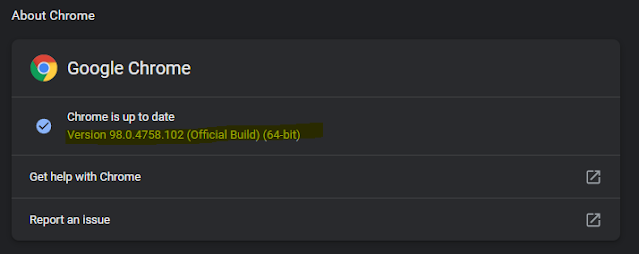
The fix is to update Chrome browser to the latest version 98.0.4758.102.  This will resolve this issue along with 10 other security issues.

The affected OSs include MAC, Linux as well as Windows users.

To check your Chrome version and update do the following,

Click on Chrome Menu buttons at top right of browser and select Settings,


Next select About Chrome at the bottom


Check your version and make sure it is 93.0.4758.102.  If not update.


That is all. Happy Hump Day!

buy a computer!  DForce Intel 11th Generation Workstations


Wednesday, August 8, 2018

Device Security - Time to rethink Mobile Security - CCleaner, not exactly free.

Is it time to consider SmartPhone security?

Your online privacy is under constant threat these days from every direction conceivable including software you install.

I spent yesterday with my CPA talking taxes, finances and data.  My CPA is extremely concerned about data security and we were taking steps to secure and make sure his PCs were protected against any threats.  However the main threat to security may not be your computer but your always connected smartphone which people are using to do banking, place shopping orders and more.

Smartphones are like having an open window allowing everyone into your world.  I mean you are carrying a LoJack system in your pocket  It's tracking and relaying where your present location.  Even if you're not using GPS it is still pinging cell towers and GPS satellites can still see you.  In other words, you can run but not hide.

It's been said that the world's most secure smartphone is the one at the bottom of a river.  So what to do?  To stay abreast and keep up in today's modern world a smartphone is a must.  The link below is to an article which lists the 4 best phones for privacy and security.  #1 may surprise you but it is still the preferred device used by many governments around the world.

https://smartphones.gadgethacks.com/how-to/4-best-phones-for-privacy-security-0176106/

In the past year, some clients and people I know have had their email and online accounts hacked.  Many times scans of their system revealed nothing.  I ask if they possibly responded to a phishing attempt.  Almost always the answer is no.  In each case, the compromised email account and equivalent phone app was also on their smartphones.  I'm beginning to wonder if its time to take smartphone security more seriously.  It could be the weak link in your online security.

Consider these facts from Malwarebytes online forum.

"These hacks aren’t happening in a vacuum. Mobile malware is a frontier ripe for cybercriminal activity. According to a 2015 Pew Research Center Report, nearly two-thirds of Americans own a smartphone, and roughly one in five of those users conduct most of their online browsing using their phone instead of a computer. The reality is that as more and more people use their phones to go online, more cybercriminals will hear the call."

 “Everything from backdoor malware that steals personal information to ransomware that locks your phone until payment is made exists in the mobile space. With millions of malware samples in the wild, there is no reason not to be concerned.”

https://blog.malwarebytes.com/101/2016/09/top-10-ways-to-secure-your-mobile-phone/


New Wi-Fi attack cracks WPA2 passwords with ease


The common Wi-Fi security standard is no longer as secure as you think.

https://www.zdnet.com/article/new-wi-fi-attack-cracks-wpawpa2-passwords-with-ease/?ftag=TRE-03-10aaa6b&bhid=2219791

Beware the Software Santa.  Free comes with a cost.

CCleaner, a software I used in Windows 98 days is currently in trouble with users due to unwanted monitoring and collection of data.  This is just the latest incident for the company.  Last year it was modified by hackers and used to serve malware.   CCleaner is available from Avast (Piriform) and is used to scrub and optimize all kinds of devices including Windows, Macs and mobile devices.

In the latest version 5.45, the company added features that many users were not pleased about.  The features in question are used for data collection.  The collection of data is performed by tasks called Active Monitoring and heartbeat which continuously send user data to CCleaner servers.  The company claims that nonpersonal and nonidentifiable data only is sent to servers, however, the difficulty in opting out is frustrating many users.  If you close the program it only minimizes and to close the program it has to be forced closed or the service stopped.

When servicing client systems I almost always find malware and PUPS (potentially unwanted software) installed.  These items compromise system security and performance.  Often times these programs are installed along with legitimate software by the user during the install process.  It is important to pay attention to the install process to make sure that you don't install more than you intended especially when Googling and installing free software.  Always pay attention to your search results and don't select a search result that isn't a direct link to the desired software or is listed as an ad.  The software may be advertised as free but they are trying to get paid.

https://www.zdnet.com/article/cc-cleaner-provokes-fury-over-active-monitoring/?ftag=TRE-03-10aaa6b&bhid=27630927001468733386426006914379


Go Fast with any one of these premium Intel Gen 8 based workstations equipped with a Solid State Drive (SSD)!


Sunday, May 14, 2017

World’s biggest cyberattack hits 150 countries and the threat is ‘escalating’

If you have not heard of the latest Malware threat that first appeared this past Thursday, then please take heed now.  It's a malware type known as ransomeware and is called WannaCry.  Cybersecurity experts say the initial targets were Russia, Ukraine and Taiwan but hospitals in the U.K., universities in China and global firms like FedEx were also under attack.

The malware is spreading by taking advantage of a vulnerability in Windows.  Microsoft release a patch in March but computers and networks that have not updated are at risk.  Microsoft has even released patches for unsupported older operating systems  including Server 2003 and Windows XP.  Computer already infected will not be helped by patching.

The ransomware attempts to seize control of an infected computer, encrypt files and then demand a ransom be paid before releasing control of the computer.

Cyberattack’s Impact Could Worsen in ‘Second Wave’ of Ransomware


On Friday an estimated 74 countries had reported infected computers.  Today that number has grown to 200,000 known victims in at least 150 countries.  Authorities are fearful that the numbers could spike with the start of the workweek on Monday when employees return and start using computers were the malware already is in hiding.


To read more; visit the links below.


Monday, February 11, 2013

Google's $199 Chromebook. What is slowing Windows down?

Acer C7 Chromebook from Google Play, $199


What can  you get for $199?

Dual-core Intel Celeron Processor
2 GB DDR3 RAM
320 GB hard drive
Wifi 802.11 a/b/g/n 2x2
Built in Ethernet/audio/HDMI/VGA/3 x USB 2.0
100 GB of Google Drive Cloud Storage for 2 years.

Allegedly, a hassle-free computer. Starts in seconds. No annoying updates. No expensive software to buy. Built for everyday use and perfect for sharing with others.

That's what Google says but is a Chromebook for everyone.  If consumers are having such a difficult time figuring out Windows 8 how will they ever adapt to the Chrome OS and life in the cloud?

It's not that hard really.  The Chromebook boots in seconds, stays up to date without the annoying update process.

The Chromebook is an excellent choice for those who need more than internet access or email.  It has a built in keyboard which allows for more productive tasks.  The Chromebook combined with remote access sites such as LogMein allow access to your office/home PC while on the road at an affordable price.

If at a minimum you have an Outlook.com account then you can create Word, Excel or Powerpoint docs using the built in Applets that come free with the account.

Let's face facts, if I have access to a good desktop I am not going to use a notebook and I know many of my clients are the same way.  So why have an expensive notebook that is under utilized when for $199 you could purchase a ChromeBook?

Sound back and let me know what you think.

What Does Slow Windows Down Over Time?

(A reprint of a Dec 28, 2009 article)

I'm not going to sit here and tell you that your Windows PC will never slow down—because for many people, they almost always do. What actually slows your PC down are too many poorly written applications that stay resident in memory and waste CPU cycles, having too many badly written low-level applications that hook into Windows, or running more than one antivirus application at a time. And of course, if you've run your PC's hard drive out of space, you can hardly blame Windows for that.
If you aren't getting the picture, the problem is usually the person behind the keyboard that installed too many junk applications in the first place. More gently put, it's often that (very well-meaning) person's gradual easing of their safeguards and cleaning regimens as time goes by.

Stop Installing Junk Applications

Installing software should be thought of like feeding your PC. If you constantly feed your PC garbage apps, it's going to get sick and won't be able to run fast anymore. These poorly written applications clutter your drive with unnecessary DLL files, add always-resident Windows services when they don't need to, bloat up your registry, and add useless icons to your system tray that waste even more memory and CPU cycles. Usually you can get away with using a few terrible applications, but as you continue to install more and more of them, your PC will slow down to a crawl.

Be Smarter About What You Do Install


We feature and recommend a lot of software applications around here, but you should keep in mind that we aren't trying to tell you to install every single one of them at the same time-just install the applications that you actually need and you'll generally prevent the dreaded format and reinstall.
Here's a few tips to help you know what applications you should be careful with:
  • Apps that function as an Explorer plug-in, because they directly hook into the shell and any problem will make your entire PC slow or in the worst case, crash repeatedly.
  • Antivirus applications are notorious for slowing your PC down, and you should never, ever, ever use more than one real-time antivirus application at a time. We recommend Microsoft Security Essentials as a free, fast, and awesome antivirus tool.
  • Anything that says it will "Speed Up Your PC" or "Optimize Your RAM" will most likely slow it down, or best case, do nothing at all. Avoid these like the plague.
  • Make sure to install official system drivers from the manufacturer website. Drivers have a huge impact on performance, and you want to have stable, updated drivers.
  • Registry cleaners are a mixed bag, and really aren't going to speed up your PC in most cases. The biggest problem, however, is that too many of the commercial registry cleaners set themselves to run at startup in the system tray, wasting your memory and CPU cycles.
  • You should strongly consider the idea of using portable applications wherever possible, since their self-contained nature means they won't clutter up the rest of your PC with things you don't need.

Keep Your Computer Clean and Trim


Once you've rid yourself of your junk application habit and resolved to only use healthy, useful applications, you'll want to make sure to keep your PC clean of any remaining clutter that doesn't need to be there. You can set up a shortcut to manually run CCleaner silently with the push of a button, but your best bet is to set up CCleaner to run automatically on a schedule, so you don't have to remember to do it.
Since CCleaner is only going to clean up temporary files, you'll still need a good solution for keeping the rest of your PC clean-and Lifehacker's own Belvedere can help you automate your self-cleaning PC or automatically clean up your download folder.
With all of this automated file deletion going on, your hard drive is likely to get a bit fragmented. If you're already running Windows 7 or Vista, automatic defrag comes out of the box and probably shouldn't be messed with, but Windows XP users will need to use Windows Tasks to setup a schedule and automatically defrag their drives.

Use a Virtual Machine or Sandbox to Test Software


If you still want to test out all of the latest software, including apps that look a bit rough around the edges, your best bet is to use a virtual machine to test out anything before putting it onto your primary operating system. You can install all of your software in an XP or Windows 7 VM just like it was a real PC, and with the latest VMWare player releases, you can even enable Windows Aero in a guest VM. If you are new to the idea and need some more help, you should check out our beginner's guide to creating virtual machines in VirtualBox, or Windows 7 users can check out our guide to using XP Mode. If you don't want to go the virtual machine route, Windows XP and Vista users can alternatively use Windows SteadyState to protect their PC and roll back all of the changes on a reboot.


TEST