Showing posts with label Firefox. Show all posts

Monday, November 8, 2021

Machine Performance suffering, try closing Chrome. Apples and PCs.

I have advised my clients for a year now to try the newest version of Microsoft Edge over Google's Chrome.  Microsoft has rewritten the Edge Browser using the same language, Chromium as the Chrome browser is written in.  This allows Edge to make use of the extensive library of extensions that have been written for Chrome.

There are more compelling reasons to use Edge or some other browser rather than Chrome.  At times my desktop computer's performance became sluggish to the point of "not responding".  What I have found is if I close Chrome the computer's performance returns.  I have multiple displays (3) and run multiple browsers, chiefly Edge, Chrome and Mozilla Firefox.  Recently I have installed the Brave browser and cut my use of Chrome.

I am writing this blog using Chrome (BlogSpot is Google's free blog), and when I check my system resources in use I find that Chrome is using more resources than Edge even though I only have 3 tabs open compared 9 tabs in Edge that are monitoring streaming data from various sites, see below.


Chrome has become bloated and now suffers the same performance issues as Microsoft's old Internet Explorer which killed Netscape and became the browser of choice in the 90's.

Microsoft's Edge is leaner and has released new features such as Vertical Tabs which I love on a widescreen monitor.

ZDNet has recently addressed Chrome's performance woes.  Below are several links that should help you evaluate you own situation.

As always, thanks for reading.  I hope you find it informative.  Also, this issue applies to Apple computers as well as PC as mentioned in the first article.

Dumping Google Chrome? Here's the best browser to replace it

It seems that to quite a few of you, the idea of dumping Google Chrome for a browser -- even if that browser is better -- is like pulling wisdom teeth. Despite the fact that it's a bottomless pit when it comes to eating system resources and has become the bloated browser it was initially meant to replace, people love it.

https://www.zdnet.com/article/dumping-google-chrome-heres-the-best-browser-to-replace-it/

Ditching Google Chrome was the best thing I did this year (and you should too)

It was about a year ago that I began my transition away from Google Chrome (spoilers, I still need to use it, but I now use it minimally).

I disentangled my data and passwords out of the browser.  I tried a whole bunch of other browsers.  I learned and relearned a whole bunch of new muscle memory movements.

It was hard.  But it was worth it.

https://www.zdnet.com/article/ditching-google-chrome-was-the-best-thing-i-did-this-year-and-you-should-do-the-same-too/

Bye-bye, Chrome: 10 steps to help you switch to Microsoft's new Edge browser

If you've been looking for an option to dump Google's Chrome browser, consider Microsoft's new Edge browser, which delivers much of the same experience you get from Chrome, with a few features that are downright superior. Here's how to get started.

https://www.zdnet.com/article/bye-bye-google-chrome-10-steps-to-help-you-switch-to-the-new-edge-browser/


DForce Workstations - Windows 11 is now available on fast, reliable DForce Workstations 

DForce workstations feature matched Processors, Mainboards and SSDs to allow you to maximize performance.  Don't make the consumer based 6 month mistake, fast now, slow later.


Monday, November 4, 2019

Dark Mode, What is it and how to enable it in Windows 10

Dark Mode in Windows 10

If you are like millions of computer users the constant glare of bright white backgrounds on your computer screen can take a toll on your eyes.  Maybe you have heard about Dark Mode for Windows.

Dark modes aren’t just for emos or for those who like dressing in black. They are better on the eyes and use much less battery which is ideal for phone and laptop users. I find webpages shown within a dark browser easier to read too. Something to do with the contrast I guess.

If you haven't heard of it and you suffer from eye strain then you owe it to yourself to try Dark Mode.  I didn't like it at first but it was because it is so different, but now I really prefer dark mode.  When I switch to the default white screens my eyes feel it instantly.  Dark mode provides instant relief.


To enable Dark Mode in Windows 10 you have to click on the Settings button, then choose Personalization.


Next click on Colors, select Dark for your default Windows mode as well as your default app mode.


Upon turning on Dark Mode, the most noticeable differences will be Windows Explorer and title bars on certain applications.


To really get the full-blown effect of Dark Mode across your entire computing environment, you need to change settings in Office 2016/365 and Google Chrome.


Dark Mode in Microsoft Office

To enable Dark Mode in Microsoft Office, (BTW, this is supported in Office 2016, 365 and 2013), follow the instructions provided by the following link;


Dark Mode in Google Chrome

Firefox and Microsoft Edge were leaders in the implementation of dark mode.

Now Google's Chrome browser also has a dark mode feature.  To enable dark mode in Chrome, you first have to enable it on Windows 10 as described above.  Once you have enabled it on Windows 10, open Chrome and type the following in the address bar;

chrome://flags

Next search flags for Dark Mode, it is an extension that you can enable or disable within the browser.

Enable the dark mode extension.
  Firefox and Microsoft Edge were leaders in the implementation of dark mode.

For a less techy approach, use the following link and read how to change Chrome to dark mode and customize the look;


DFORCE Intel Generation 8 and 9 workstations


Wednesday, May 15, 2019

Warning! If You Save your Passwords in a Browser, Don't miss this Blog Post

If you use your favorite internet browsing program to save passwords for websites, you might want to rethink this policy.  This includes all browser programs, Chrome, Firefox, IE and Safari.  In 3 of these, I found the saved passwords were only protected by a user's password or in the case of Safari, the Admin password.  The other major browser has a default policy of no password and will expose passwords with a few clicks of the mouse, however, it does allow you to set a Master password separate from a user password.

If you continue to use this method to save passwords please use a strong password and not one you use for all your protection including websites.  However, if your browser uses a User or Admin password to protect saved website passwords, I have programs that can crack a forgotten password or generate a new password for a user.  In the event your computer is stolen or accessed by a hacker or criminal, they can simply change your password and then proceed to steal your financial website's user name and password.

Lastly, beware this information is readily available using a Googe search.

Google Chrome

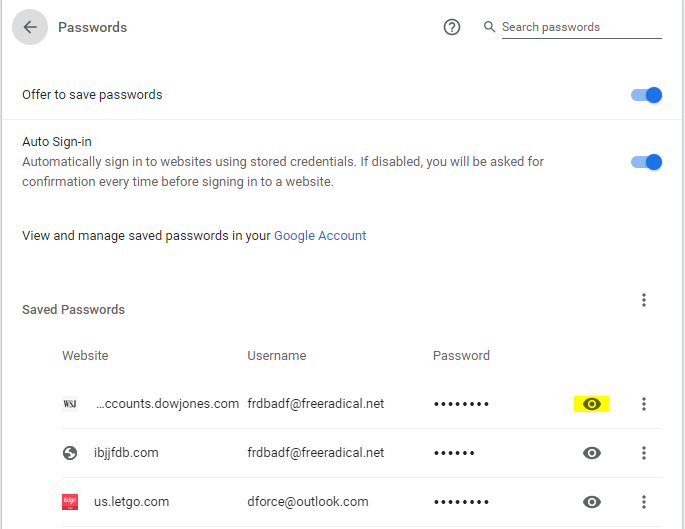
I knew about the Password list under settings of Google Chrome but I had never paid any attention to the settings and details of the list.  Last week a client needed to be able to log in to a company web publishing account that was created by a user who had left the company.  I suggested checking if they had saved the account password in Chrome.  Then we could use Chrome to auto login and change the password.  I checked the password list to see if the password was saved.  What I found was that Chrome will easily spill all its content about passwords, Banks, Stocks, Credit Cards, Facebook, any password that is in the saved password list.

By default, passwords in Chrome's password list are masked by dots to prevent one from seeing the actual password, however by simply clicking on the eye icon next to a password Windows will prompt you for your user login password or pin and voila, all passwords can be viewed by clicking on the eye icon to the right of a saved password.

If you have ever shared your password with a family member, co-worker or haphazardly use easy passwords for protection then any financial, confidential or social media sites you visit that have a saved password can be viewed and compromised.  And let me add this, if I know this then hackers and criminals know this and if your computer is compromised by a trojan or malware then they know where to look to get access to your confidential Financial and Personal information.  These steps are easily found by Googling for the information.

To illustrate how to expose your password info under Chrome, click on the 3 dots in a line, upper right corner of Chrome browser, then select Settings from the drop-down.


Next click on Passwords,


When you do this the saved and not saved Password list appears


Once the list appears, all I have to do is click on the eye icon and the system will respond with the following Window asking for the computer password/pin.


Once you have provided the computer with the correct password/pin, Chrome will then allow you to reveal the hidden password for every saved account.

Below is my IBJJF password exposed (since changed)...


You might think all this is bad enough but no, there's more.

I have a Chromebook and Android phones.  If you have provided your Gmail account to these devices and have Sync and personalize Chrome across your devices turned on, you can go to My Google and find all saved passwords from your Chrome and Android based devices.


Mozilla Firefox and Microsoft Internet Explorer

You may think I'm saying not to use Google Chrome or I am picking on Chrome.  I started with Chrome because it is the most popular Windows Browser now.  However, FireFox and IE both have the same issue.

The default setting for Firefox doesn't require you to provide a password/pin to show passwords.  All you have to do in Firefox is click on the settings icon in the upper right of the Firefox browser, select options,


choose Privacy & Security,


next click on Login & Passwords, Saved Logins.  


click on Saved Logins and you are 1 step away for revealing all saved passwords.

Note:  Mozilla does allow you to "Use a master password" which you will want to do.  This is a better option in my opinion than using the user password for a computer, however as stated this is not the default and Mozilla is wide open otherwise.

Internet Explorer

To accomplish the same feat in IE, go to Internet Tools.  If your browser has the Menu Bar option on simply click on Tools and then select Internet Tools from the dropdown, if you don't see the Menu Bar you can access Internet Tools from the Control Panel.


Next click on the Content Tab and select Settings under AutoComplete


Click on Manage Passwords


To expose a password click on the carat symbol to the right of the password.


As you can see the user ID is already there, you will be asked to provide the user password/pin to reveal the password.


Safari

Apple's Safari browser protects Macs behind the Admin password.  This is only as secure as the password is strong and breakable using 3rd party hacker software.



Tuesday, December 11, 2018

Report: Microsoft Will Scrap Edge for Chromium-Based Browser

Microsoft's Edge browser which was meant to supplant Internet Explorer as the default built-in browser in Windows 10 is in for a major overhaul.  While very innovative with new features, Microsoft tried to push it on users by making it not only the default browser but the default for documents, PDFs and many other applications that users did not want.  The final death knell for Edge 1.0 was the dearth of extensions (add-ons) for Edge.  Extensions are small add-ons that bring extra features, such as adblocking, VPN, password management and more.  While Edge did have some extensions available the number is small when compared to Chrome.  Many developers ignored Edge and concentrated on Chrome due to its popularity.

Microsoft plans to recreate Edge using Chromium.  Chromium is the open source project behind Google Chrome and Chrome OS.  This will allow Edge to use Chromium extensions.

Given Google's demonstrably shown penchant toward censorship of information available based upon its own beliefs and biases, is this a good thing?  Google's attempt to move into the Chinese market has led to bending to the whim of the Chinese government.  The search engine being developed for use in China allows for restrictive access to information and the ability of the government to track individuals locations and searches.  Some Chinese Google employees are raising alarm bells risking the ire of higher-ups and job security.

Is this who you trust to keep your info safe?

https://www.extremetech.com/internet/281715-report-microsoft-to-scrap-edge-for-chromium-based-browser

https://www.techradar.com/news/microsoft-confirms-edge-will-be-able-to-use-google-chrome-extensions

https://www.theguardian.com/technology/2018/sep/18/google-china-dragonfly-search-engine

https://finance.yahoo.com/news/exclusive-3-chinese-google-employees-202114194.html

Browser Alternatives and the future of Internet Explorer

On my desktop I use Edge, IE, Chrome and Firefox.  I use them all since I have to maintain multiple sessions of Office 365, LogMeIn and other programs concurrently which preempts multiple logins within the same browser.  I use Internet Explorer a lot because of compatibility issues with some websites.  I use Chrome because of the balkiness and performance issues with IE and I use Firefox more often than I use to because of Google's privacy issues and upper management's continued contempt and arrogance on certain issues.

Originally Microsoft committed to continued support of Internet 11 throughout the life of Windows 10.  However Microsoft has not hidden its attempt to push users toward Edge and even if Microsoft continues with security patches, I don't believe it will continue to add improvements or features found in Edge and other browsers.

Opera browser - https://www.opera.com/

Firefox by Mozilla - https://www.mozilla.org/en-US/firefox/new/?utm_medium=referral&utm_source=firefox-com

Facebook has its own issues.

Facebook too is under increased pressure about how it uses information collected by tracking you.  Did you know that before Facebook, Mark Zuckerburg originally wrote FaceMash which purpose was to rank women at Harvard?  FaceMash would pull photos of Harvard students off of Harvard's Web sites.  When people visited Facemash.com they would see pictures of two Harvard students and be asked to vote on which was more attractive. The site also maintained a list of Harvard students, ranked by attractiveness.

In the fall of 2003, Harvard seniors Cameron Winklevoss, Tyler Winklevoss, and Divya Narendra were on the lookout for a web developer who could bring to life an idea the three say Divya first had in 2002: a social network for Harvard students and alumni. The three had been paying Victor Gao, another Harvard student, to do coding for the site, but at the beginning of the fall term Victor begged off the project. Victor suggested his own replacement: Mark Zuckerberg, a Harvard sophomore from Dobbs Ferry, New York.

The rest is history and the remake of the future.

https://www.businessinsider.com/how-facebook-was-founded-2010-3

Doom: 25 years of a gaming legend

Hard to believe it has been 25 years since the release of Doom.  I had been playing Star Wars and Wolfenstein, another ID software 1st person shooter game about infiltrating Hitler's castle full of Nazi, SS soldiers and shooting them up.  That was in the day of Novell networks, 386 and 486 computers.  Enter Doom... after the 3rd time of being destroyed by the fireball throwing Imps of Doom I had to kick back, tell myself "relax"  it's only a game, WOW!  We were entertaining a friend's you son Chase that day.  Chase was only about 5 but he stayed in the office with me while I was on the computer.  Come here, watch this Chase I said...  I started another Doom episode and when I rounded the corner and the hellish Imps appeared throwing fireballs quickly killing my character.  I exclaimed, you see that Chase?!!!  I turned around, Chase was gone, hahaha!  25 years ago.

I recently got an update on Chase.  He is into the gaming industry and is now being paid to play and evaluate games.  Wow again.

https://www.techradar.com/news/gaming/doom-20-years-of-influencing-gaming-1205980

INTEL Gaming Systems by Driving Force

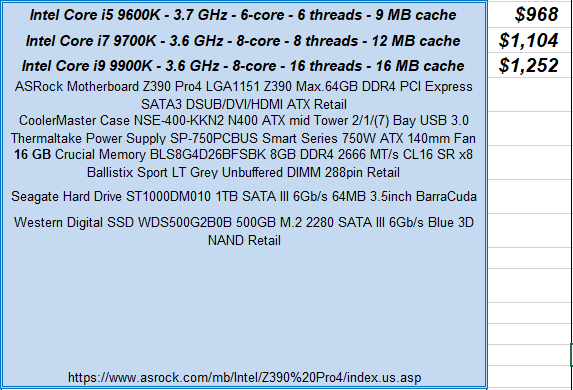
beginning with the Generation 8 processors, Intel unveiled a new design for Desktop processors including more cores, threads, and features not found or supported with prior generations.  These processors, platforms coupled with Intel Optane memory offer unparalleled performance compared with prior offerings.


read this comment from a satisfied customer using an entry level Intel Core i3 8300,

12-10-18, J.Griffin:  Man!! My computer is so fast , THANK YOU!!  and I put a new roller in my scanner and it’s scanning multiple pages again. Feels like Christmas!! 😊

Now the ultimate platforms for gaming and graphics featuring Intel Gen 9  Core i5, i7 and the most powerful desktop processor ever, Intel Core i9 9900K.


Wednesday, February 14, 2018

Web Browsing done Right?

HAPPY VALENTINE DAY!!!  Web Browsing done right?

Google’s Chrome ad blocking arrives tomorrow and this is how it works

 As the internet matures into the de facto way we now view and acquire our news, some news sources are no longer providing free access.  This is particularly true of newspapers who have seen their print circulation and ad revenue declining.  I have no problem with this and subscribe to a couple myself.  However there are some sites that are loaded with pop up ads and auto play ads that are particularly annoying.  I have given up on finding out anything on the Weather channel's website other than current temperature and weather conditions for my area.

Starting tomorrow 02/15/18, Google's Chrome introduces new ad blocking technology to help better your browsing experience.

"The ad blocker itself will show up in Chrome’s address bar on the desktop (similar to a pop-up blocker icon), and on mobile a small prompt at the bottom of the screen will show that ads are blocked on a site. Both desktop and mobile users will have the option to allow ads on a site that’s automatically blocked. Google says that the aim of the ad blocker is to improve web ads, and that 42 percent of sites that were failing the Better Ads standards have resolved their issues already."

to read the full article and see what Google's new ad block brings please click;


are you Tired of texting? Google tests robot to chat with friends for you

Do you have friends who are constantly texting you throughout the day.  You know the ones who you don't know how they get their jobs done because they are always texting.  Well thanks to Google help is on the way.  (as if socializing isn't dead yet, social media :-)).

https://www.theguardian.com/technology/2018/feb/14/google-tests-robot-chat-reply-friends

Browser options, more that you think.

Everyone is aware of the 3 major browsers used for surfing the internet but did you know that there are many more choices available for use?  Besides Internet Explorer, Chrome and FireFox there is Tor (notable for the Dark Web use), Yandex, Dooble and more.  A client was even using one called the "Crazy" browser when we first met.

To explore these options use the links below or to read the full TechWorld article click on;


CONTENTS

Tuesday, April 29, 2014

Microsoft Warns of Internet Explorer Zero-Day Bug, Dangers of XP

Microsoft Warns of Internet Explorer Zero-Day Bug, Dangers of XP

from PCMag.com:

Microsoft has released a security advisory that warns about remote code executions in various versions of Internet Explorer.
"This issue allows remote code execution if users visit a malicious website with an affected browser," Microsoft said. "This would typically occur by an attacker convincing someone to click a link in an email or instant message."

http://www.pcmag.com/article2/0,2817,2457206,00.asp

Government urges all users to switch to another Browser, Firefox or Chrome until IE Bug fixed

http://www.zdnet.com/governments-urge-internet-explorer-users-to-switch-browsers-until-fix-found-7000028869/?s_cid=e539&ttag=e539&ftag=TRE17cfd61


How Ditching Windows XP will make the Whole Internet Safer 

from link above, www.mashable.com

" — more than 27% of all computers worldwide still run the software — holdouts are inevitable.
That poses a growing danger not just to those PCs, but to any system coming into contact with them. With significant market share and no more official support, Windows XP will become a prime target for malware creators."

Alternate Browser links:

Firefox               http://www.mozilla.org/en-US/

Chrome             https://www.google.com/intl/en/chrome/browser/?hl=en&brand=CHMI

Safari                 http://support.apple.com/kb/DL1531


TEST